Kristina Schulz

Updated 8 months ago

Explain your points quicker and better

Screenrec is a cost-free screen capture utility developed by teddysoft-ltd. On any of your compatible Windows desktops, you can opt to quickly send a video message or take a screenshot when trying to elaborate on specific issues or ideas. This aids you a lot in getting your point across faster and allows saving tons of your precious hours.

Top Recommended Alternative

Its full version is available to download and utilize without a single cent. Compared relatively to Bandicam Screen Recorder, Screenrec is a simpler and more affordable alternative that enables you to record your screen and capture it.

Simple utility with powerful features

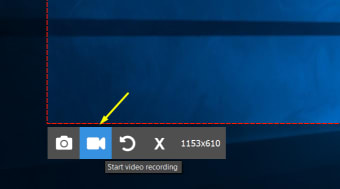
This screen recorder is so easy and instant that you'll quickly get started within 60 seconds. It has the power to record your voice, webcam, and your desktop audio. You can opt to add a facecam overlay on top of the screen you'll capture. Moreover, it supports Cloud Recording technology and puts no watermark or time limit. Recording can be done in three simple steps. First, you have to select the area—you can take a shot of the entire screen or just a specific part of it. 

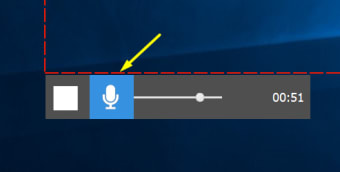
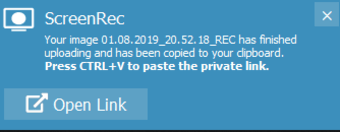
Afterward, you'll press the record button and start capturing your desktop, system sound, and/or mic. All the recorded contents will be saved automatically to the private cloud account you connected. Lastly, once you press the 'Stop' button, it'll prompt you to its sharing link. The video output will be exported in the universal MP4 format that’s supported by all modern devices. It guarantees flawless recording of 1080p at any frame rate between 15 to 120 FPS. Furthermore, there's a gallery available to easily track down all your past projects.

Screenrec vs. Bandicam

Screenrec is a cheaper substitute for the premium and paywall-restricted services of Bandicam. The free-of-charge recording solution from teddysoft-ltd is strongly capable of capturing your Windows desktop screen, whether through a still image or moving video. It guarantees no time limit or huge watermark applied to your project, allowing you infinite taping capability without ever ruining the quality of the content you took. Furthermore, it supports annotation, enabling you to insert simple captions that can add to the clarity of the instructional clip you're creating.

Nonetheless, Bandicam is a more solid companion when it comes to capturing game actions as it presents various recording modes that are specifically dedicated to taking adventure-filled gaming videos. However, for those who are short on budget, this isn't really a recommended program as it can only provide you with a 30-day free trial and requires a licensed subscription to continue using its services. Thus, if your screen capture project only requires basic recording and editing, Screenrec is a better option for you to download.

An instant way to communicate

Screenrec exhibits convenient features that help you quickly and clearly explain your point to your team members, bosses, and business clients. It is packed with powerful recording functions and capabilities that you can share with your intended receiver instantly. No time limit or watermark will ever disrupt the quality of your screenshots, making this an impressive screen capture solution that is often better than some of the paid recorder utilities.


Kristina Schulz

Kristina has professional experience in Europe, the United States, and Asia, specializing in communication and languages. She values adaptability in multicultural settings and brings this perspective to her writing. Her content reflects clarity, cross-cultural awareness, and practical expertise in connecting ideas through language.

  • Pros

    • Quickly and clearly get your point across
    • Powerful recording functions
    • 1080p flawless recording capacity
    • Easy and simple recording steps
  • Cons

    • No video editing features
 0/4

App specs

Also available in other platforms

Program available in other languages


Icon of program: Screenrec

Screenrec for PC

  • Free
  • 4.6
    58
  • 106.2K
  • V5.0.13

User reviews about Screenrec

4.6

41 reviews

Add review

Main reviews for you

  • Anonymous user

    ScreenRec is good for developers who would wish to explain a bug report or to show how a given feature in the application works. This feature makes it possible to provide feedback in real-time hence making it easier to develop capabilities needed in the development process.

  • Anonymous user

    ScreenRec excels as a tool for educators, providing a straightforward solution for giving detailed visual feedback on student submissions. Its ease of use and quick sharing capabilities enable teachers to efficiently convey comments and instructions, enhancing the learning experience.

  • Anonymous user

    Due to its lightweight and simplistic interface, ScreenRec is a great option for beginners and professionals alike. Despite its light size, it's packed with important features for various use cases. Professionals will especially appreciate free cloud storage for a long screen-recording time and a watermark-free recording experience in HD quality that ensures the video can be used professionally immediately.

  • Anonymous user

    ScreenRec is a powerful screen recorder that offers impressive features for a free software. The output audio and video quality offered is in HD with a maximum resolution of up to 1440p making it ideal for professionals and content creators. The simple navigation makes it very easy to learn and the small file size keeps it from lagging or slowing down even on low-end PCs. All-in-all, it's a great option for users who don't want to pay to record their desktop activities.

  • Anonymous user

    It's incredible how a free screen-capturing tool like ScreenRec helped our customer support team achieve unprecedented success. For starters, there was no learning curve with ScreenRec as it has a simple interface and easy-to-understand navigation. The support team emphasized more on visuals by recording complex processes or simply taking screenshots. With this combination, customers were able to understand their issues more quickly and the support team thrived by resolving their issues, thereby increasing first-touch resolution.

  • Anonymous user

    Its amazing how a software as simple as ScreenRec can deliver so much without costing anything. This free screen recorder offers continuous HD audio and video output with a resolution of up to 4K that is almost a luxury. Free cloud storage lets users save the recording online that is shareable with with an automatically-generated secure link.

More

You may also like

Alternatives to Screenrec

Explore Apps

Latest articles

Laws concerning the use of this software vary from country to country. We do not encourage or condone the use of this program if it is in violation of these laws.
Softonic

Is Screenrec safe?

100/100

Score result: Clean

This file passed a comprehensive security scan using VirusTotal technology. It is safe to download.

  • Virus free
  • Spyware free
  • Malware free
  • Verified by Security Partners

    VirusTotal logo

Scan Info

Last scan
Thursday, February 5, 2026
Scan provider
VirusTotal · Full report

File Integrity

File
Screenrec_V5.0.13.exe
SHA256
64afb2c70f928f484aca6166060e696f30dcbd78f6219aede8c6aaf2abea2b87
SHA1
0a6c6a7322d778c408d0389da9c7e234a84ffb32

Softonic security commitment

Screenrec has been thoroughly scanned by our advanced security systems and verified by industry-leading partners. This file comes from the official developer and has passed all our security checks, showing no signs of viruses, malware, or spyware. For more information, visit our Security and Trust Center